Agenda Slide Templates
Agenda slides are basically just content slides with a predefined structure. With a few agenda elements. You can create a slide that gives an overview of the presentation’s structure. The agenda slide templates are not specific class es like the other slide templates. They are just a collection of elements that can be copy and pasted to get going quickly.
Minimal Agenda Slide
Example: MyAgenda 
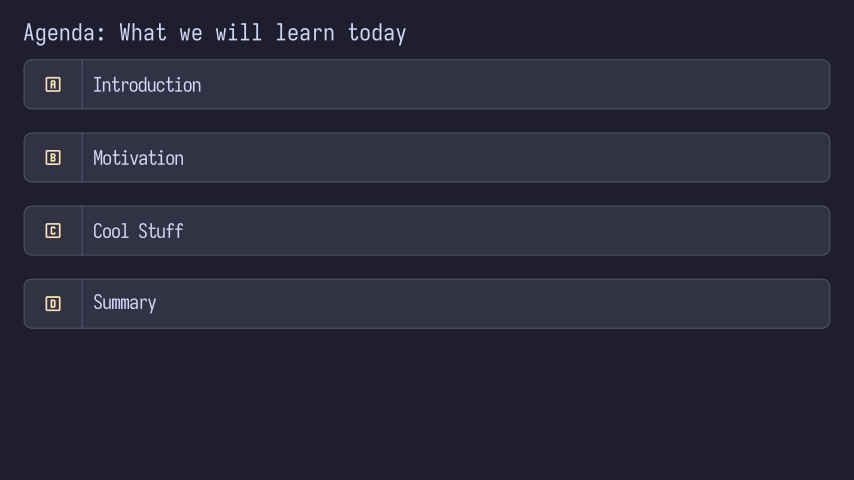
Code: MyAgenda
import manim as m

from manta.slide_templates.title_slide import TitleSlide


class MyAgenda(
    TitleSlide  # this is the base class for creating a slide which has title and subtitle elements
):

    def construct(self):
        self.play(
            self.set_title_row(
                title="Agenda",
                seperator=": ",
                subtitle="What we will learn today"
            ),
        )

        agenda_point_a = self.icon_textbox(
            text="Introduction",
            icon='alpha-a-box-outline',
            width=self.content_width,
        )
        agenda_point_a.to_edge(m.UP, buff=1.0)

        agenda_point_b = self.icon_textbox(
            text="Motivation",
            icon='alpha-b-box-outline',
            width=self.content_width,
        )
        agenda_point_b.next_to(agenda_point_a, m.DOWN, buff=self.med_large_buff)

        agenda_point_c = self.icon_textbox(
            text="Cool Stuff",
            icon='alpha-c-box-outline',
            width=self.content_width,
        )
        agenda_point_c.next_to(agenda_point_b, m.DOWN, buff=self.med_large_buff)

        agenda_point_d = self.icon_textbox(
            text="Summary",
            icon='alpha-d-box-outline',
            width=self.content_width,
        )
        agenda_point_d.next_to(agenda_point_c, m.DOWN, buff=self.med_large_buff)

        animation_group = m.AnimationGroup(
            *[m.FadeIn(elem) for elem in [agenda_point_a, agenda_point_b, agenda_point_c, agenda_point_d]],
            lag_ratio=0.15
        )

        self.play(
            animation_group
        )

        # indicate a agenda point
        # self.play(
        #    m.Circumscribe(agenda_point_a, color=self.blue)
        # )

        # alternatively, you can use the following code to indicate a agenda point
        # surrounding_rect = m.SurroundingRectangle(
        #    agenda_point_b,
        #    corner_radius=0.125, color=self.blue)
        # self.play(
        #    m.Create(surrounding_rect)
        # )


if __name__ == '__main__':
    # uncomment this line if you want to render the scene in video format
    # MyAgenda.render_video_medium()

    # this line will show the last frame of the scene when the script is run
    MyAgenda.show_last_frame()