Content Slide Templates
Content Slide Templates are used to create slides that contain the main content of a presentation.
The Slide Templates below are used to create slides that contain the main content of a presentation.
In the bottom, left corner of the slide, the slide number is displayed. Whenever the play method is called on the
scene, the slide number is incremented by one. The manim object, that contains the slide number can be referred to by
self.slide_index.
Minimal Slide
Example: MyMinimalSlideTemplateExample 

Code: MyMinimalSlideTemplateExample
from manta.slide_templates.minimal.minimal_slide_template import MinimalSlideTemplate


class MyMinimalSlideTemplateExample(MinimalSlideTemplate):

    def construct(self):
        self.play(
            self.set_title_row(
                title="Lucky Numbers",
            )
        )

        self.play(
            self.change_subtitle("Uncovering the Math Behind Good Fortune!"),
        )


if __name__ == '__main__':
    MyMinimalSlideTemplateExample.show_last_frame()
Classic Slide
Example: MyMinimalSlideTemplateExample 
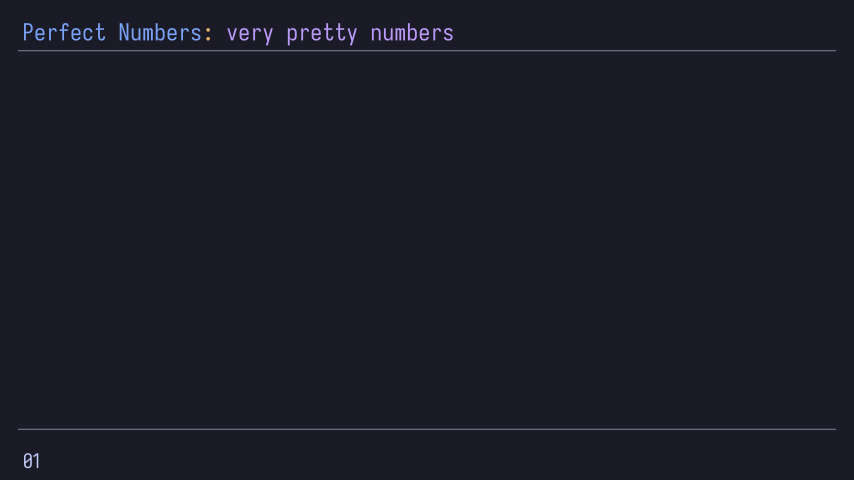
Code: MyMinimalSlideTemplateExample
from manta.color_theme.tokyo_night.tokyo_night import TokyoNight
from manta.slide_templates.classic.classic_slide_template import ClassicSlideTemplate


class MyMinimalSlideTemplateExample(
    TokyoNight,  # TokyoNight is a color theme
    ClassicSlideTemplate  # ClassicSlideTemplate is a slide template
):

    # The following class variables can be used to override the default colors of the title row
    subtitle_color = TokyoNight.magenta
    title_color = TokyoNight.blue
    title_seperator_color = TokyoNight.yellow

    def construct(self):
        self.play(
            self.set_title_row(title="Perfect Numbers", seperator=": ", subtitle="very pretty numbers"),
            self.add_seperator_lines()
        )


if __name__ == '__main__':
    MyMinimalSlideTemplateExample.show_last_frame()
RWTH Slide
Example: MyRwthSlide 
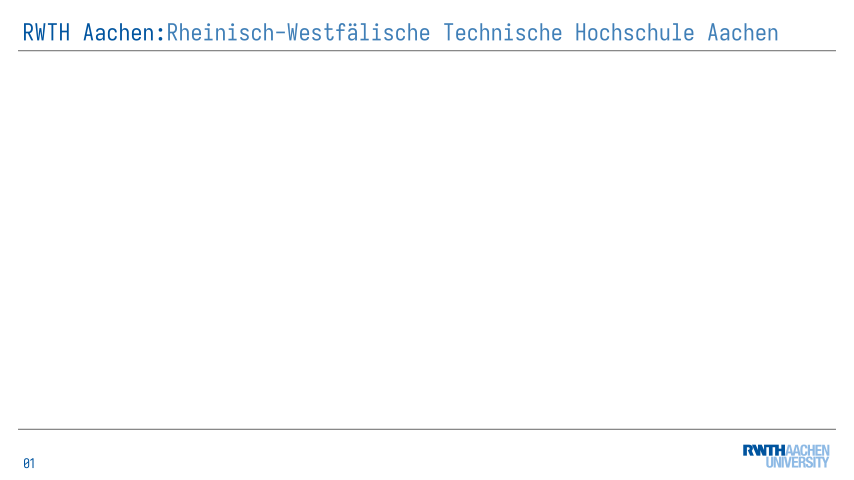
Code: MyRwthSlide
from manta.slide_templates.rwth.rwth_slide_template import RwthSlideTemplate


class MyRwthSlide(RwthSlideTemplate):

    subtitle_color = RwthSlideTemplate.rwth_blau_75

    def construct(self):
        self.play(
            self.set_title_row(
                title="RWTH Aachen",
                seperator=":",
                subtitle="Rheinisch-Westfälische Technische Hochschule Aachen"
            ),
            self.add_logos(),
            self.add_seperator_lines(),
        )


if __name__ == '__main__':
    MyRwthSlide.show_last_frame()